If you like this plugin, please, rate it on Fab. Thank you!
US IAB support
This guide outlines the steps required to support the US states regulations message as part of the UMP SDK. Pair these instructions with Get started, which details how to get your app running with the UMP SDK and set up your message. The following guidance is specific to the US states regulations message.
Prerequisites
- Complete the Get started guide. Be sure to implement a privacy options entrypoint and render it if required. By completing this guide, you have an entrypoint to serve your US states regulations message to your users.
- Create a US states regulations message for apps.
- If you're using the US states regulations message alongside other messages, consult Available user message types to understand when different messages are displayed to your users.
Set the tag for under age of consent
To indicate whether a user is under the age of consent, set TagForUnderAgeOfConsent (TFUA). When you set TFUA to true, the UMP SDK doesn't request consent from the user. If your app has a mixed audience, set this parameter for child users to ensure consent is not requested. It is your responsibility for setting this parameter where necessary to comply with COPPA and other relevant regulations.
Note
The UMP SDK does not forward the TFUA tag set on consent requests to Google Mobile Ads SDK or any other ad SDKs. You must explicitly set the TagForUnderAgeOfConsent or TagForChildDirectectedTreatment on ad requests. If you don't set the TagForUnderAgeOfConsent or tagForChildDirectectedTreatment on ad requests, the UMP SDK does not collect any information that allows Google to determine whether or not users under the age of consent use your app. For more information about data processing restrictions for these users, see Tag an ad request from an app for child-directed treatment.
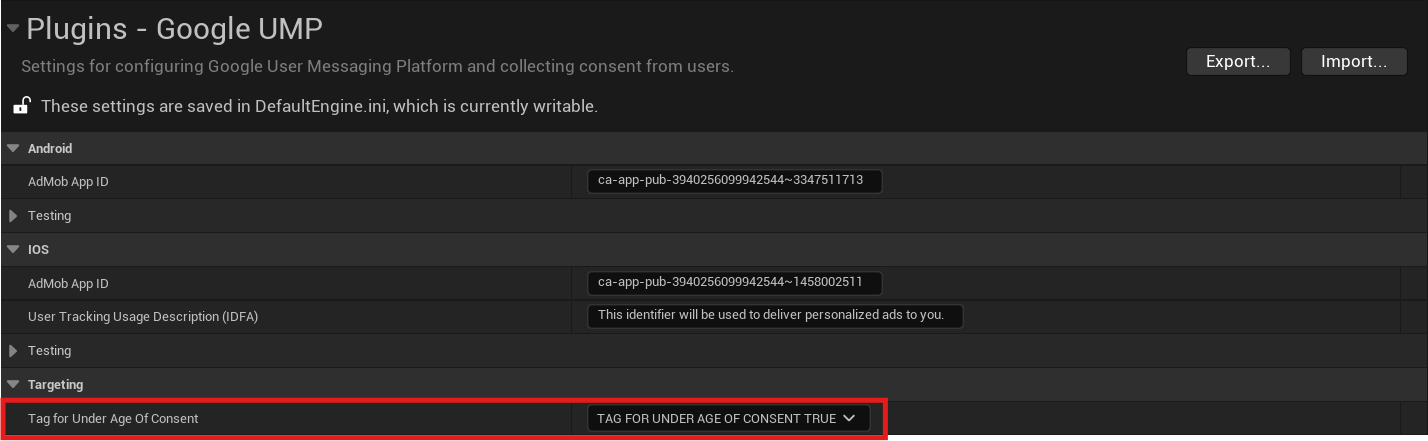
You can also override the default value of TagForUnderAgeOfConsent set in Project Settings at runtime using UGoogleUMP::SetTagForUnderAgeOfConsent() function. Just make sure to call it before requesting consent info update.
Read consent choices
After the user has made a US states regulations decision, you can read their choice from local storage following the Global Privacy Platform (GPP) spec. For more details see, In-App Details. Note that the UMP SDK only populates the IABGPP_GppSID and IABGPP_HDR_GppString keys.
Test your US states regulations messaging
To test your US states regulations messaging, set the Debug Geography Area field in Project Settings to DEBUG_GEOGRAPHY_REGULATED_US_STATE to force the UMP SDK to treat your test device as if the device were located in a regulated US state. You can also use DEBUG_GEOGRAPHY_OTHER to force suppression of US states regulations messages. For more details on Debug Geography Area, see Force a geography.